Ultimate Kenku with Discord Bot to use Syrinscape with Local Sound for Online Play

I am rezzing this thread since I’m returning after a long layover (read: too much work!).

For sound quality, can Kenku and Discord be wrestled to the ground to deliver high quality sound (without sending Discord wagon-loads of gold for server boosts)? Apologies if this is a repeat question–I’ve seen some comments that it depends on a lot of Discord circumstances. To skip to the end, though, is high quality sound consistently possible with the Kenku-Discord setup? (By “high quality sound” I don’t mean the crackling and skipping problem–I mean the sound quality once the connection is functional… On other setups, I have found Discord to downgrade full stereo/surround to hand-crank Victrola quality, no exaggeration.)

If I’m going to go the trouble of creating a beautiful soundscape and enticing reluctant players into enjoying it, it’d be ideal if the quality of performance is immersive and transports the players to another time and place.

I think @benjamin will recommend here the direct link from Syrinscape Online, correct? In which case I must bribe players with fish extra experience points…

2 Likes

I just saw the Nova video (excited for the future there!) and thought maybe I should log in to the forums again and look around. It’s been a while, and I wanted to respond!

Basically, if you want the highest quality, one thing Syrinscape’s audio is known for, you should use their web player link and send it to your players. It will offer the best experience for your players in terms of sound quality/surround sound.

For myself, a lot of the people I play with are like cats trying to be taken to a bath, so having the sound in Discord is one less thing I must worry about, and I don’t mind the quality knock. My Discord server is boosted to level 2 based on all the people in my server, and I am boosting with a normal Discord subscription. Below is the quality you will get based on your subscription:

Maximums are below; the default is 64 Kbps per channel unless you change it.

  • Level 0 (No boosts): 96 Kbps
  • Level 1 (2 Boosts): Increases voice channel audio quality to 128 Kbps.
  • Level 2 (15 Boosts): Increases voice channel audio quality to 256 Kbps.
  • Level 3 (30 Boosts): Increases voice channel audio quality to 384 Kbps.

So, powered by this, you can make the best decision for you and your party! :blush:

2 Likes

So true.

So we are all hostage to Discord and its sound quality decisions. Hmmm…

To be the slow horse here, is voice channel audio quality the same as sound/music audio quality? I suppose it must be.

It seems that voice channel quality directly affects any audio people hear over Discord. Bots can send up to 384 kbps, but the output for you and your players is limited to the channel that you’re hanging out on.

Check the channel you’re playing the bot in without boosts; the default is 64 kbps, and you can set it as high as 96 kbps, which is already about 35% better than the default.

Maybe I should do an example on youtube of the various bitrates… Hmm! :slight_smile:

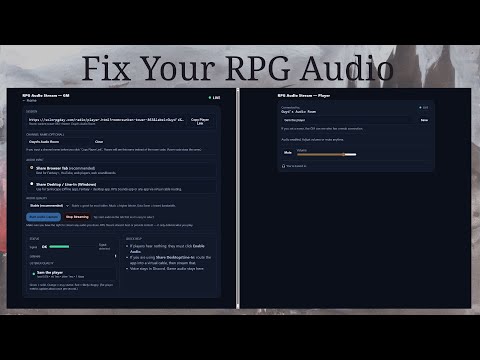
Hey, Amerisun. Good to see you here! I loved your video a few yrs back on kenku. Never quite worked for me as it was always a bit resource intensive for me but I know it helped a ton of people. Sounds like you want to stay in discord but wanted to let you know I created a free, very lightweight way to stream audio to players without downloads (except optionally for the GM if they need a virtual cable). Low latency and getting great feedback so far. Works for Syrinscape (nova, web, offline player). Would love your thoughts on it if you have an interest.

1 Like

Hey lordgwydione!! This looks really slick. I can see the appeal, especially for groups that want a clean, dedicated way to handle shared audio from anything on the DM’s machine.

For my setup, I’m currently covered with Kenku. I can facilitate local MP3s, Syrinscape or YouTube, and Kenku lets me stream and pre-build audio sets ahead of time when I’m not using Syrinscape. Between those tools, I’m getting everything I need without any friction on the players side. Technically you could also use Kenku with your tool, but it would require the audio cable which I had serious issues with when I tried those solutions, and the aforementioned friction.

I do have a suggestion for your player-side tool. One reason people push audio on Discord is that getting everyone to reliably connect via a URL can be a bit of a cat-herding exercise. If you want to reduce friction, a nice improvement would be to auto-generate a “User ###” name and start the stream automatically after the link is pasted, so players have as few steps as possible to start listening. Friction is the main reason most people go to Discord, albeit putting more work on the DM. Just some thoughts.
:slight_smile:

1 Like

I appreciate the suggestion and will definitely investigate!

So are you envisioning voice via Discord, then a unique link shared in Discord that auto-opens a new player window with superior sound streaming?

That’s how Syrinscape is built, you can copy the link to the playback and each player would open that in a browser to connect to your soundscape.